Saturday, August 18, 2018

Platformer Game 1.0.0.0


Download: https://goo.gl/UK3opA

Platformer Game is my very first game created in Python programming language. The project contains only about 500 lines of code and 8 Python modules (in alphabetical order): Counter, Game, GameObject, MapLoader, Pickup, Player, Sounds and Values. Class inheritance is implemented for some game objects such as player and pickup items. Values module has important game data like screen resolution and other settings. The project is compiled into stand-alone executable file using PyInstaller (a program that freezes Python programs/packages into stand-alone executables). The executable file can contain all required data files (images, sounds and music) and also DLL files. Game music requires libogg.dll, libvorbis.dll and libvorbisfile.dll. There is no need to worry about audio playback because all required DLLs are packed into the executable. The executable file size is less than 9 MB. Version info and custom icons can be easily set with a little piece of code for the compiled file. The game uses custom font and game graphics are created in Inkscape. The levels of this game are created in Notepad where each letter represents game object such as player, wall and coin. Well, this is only a small demo game which I made in 2 days. I hope you'll like it.

Controls:
W/A/S/D: Move
Space: Jump
Enter: Start game
Escape: Quit

Gameplay:
Collect all coins.

Platformer Game 1.0.0.0 (Gameplay Video)


Download: https://goo.gl/UK3opA

Platformer Game is my very first game created in Python programming language. The project contains only about 500 lines of code and 8 Python modules (in alphabetical order): Counter, Game, GameObject, MapLoader, Pickup, Player, Sounds and Values. Class inheritance is implemented for some game objects such as player and pickup items. Values module has important game data like screen resolution and other settings. The project is compiled into stand-alone executable file using PyInstaller (a program that freezes Python programs/packages into stand-alone executables). The executable file can contain all required data files (images, sounds and music) and also DLL files. Game music requires libogg.dll, libvorbis.dll and libvorbisfile.dll. There is no need to worry about audio playback because all required DLLs are packed into the executable. The executable file size is less than 9 MB. Version info and custom icons can be easily set with a little piece of code for the compiled file. The game uses custom font and game graphics are created in Inkscape. The levels of this game are created in Notepad where each letter represents game object such as player, wall and coin. Well, this is only a small demo game which I made in 2 days. I hope you'll like it.

Controls:
W/A/S/D: Move
Space: Jump
Enter: Start game
Escape: Quit

Gameplay:
Collect all coins.

Wednesday, August 8, 2018

Traffic Light (HTML/JavaScript)


New small open source project available on GitHub. I have been often creating traffic related software, so here is a traffic light for vehicles created in HTML/JavaScript. The traffic light states are stored into an array of frames (numbers that signify each state). There are five traffic light states in total. The timer interval is set to 100 milliseconds. This traffic light can be easily created in less than 100 lines of code. The canvas is responsive (it can fit to different screen sizes). That feature is realized with a combination of CSS and JavaScript. JavaScript code uses window resize event for handling size changes.

Try it online at: https://nihadliu.github.io/traffic-light/

Visit my GitHub profile: https://github.com/nihadliu

Monday, August 6, 2018

Space Scape 1.0.0.0 (HTML/JavaScript)


My another open source game project released on GitHub. Space Scape is originally created in C++ programming language but this is a basic shooter game version created in HTML/JavaScript. Sound effects and fonts are used for polishing the game. The game screen is responsive, which means that it can fit to different computer screens. I used combination of CSS and JavaScript to achieve this functionality. I hope this small project can be helpful to you in learning and creating something new. The project itself is not so complex, it has only around 600 code lines.

Gameplay:
Red enemy space ships are coming from the top of the screen. You have to destroy them to get score. The game level will be increasing after some time and more and more enemies will be coming down. Do not crash, you have only one life.

Controls:
W/A/S/D: Move
Space: Shoot

Play online at: https://nihadliu.github.io/space-scape/

Visit my GitHub profile: https://github.com/nihadliu

Thursday, August 2, 2018

Racing Game 1.0.0.0


My first open source game project released on GitHub. The game is created 4 years ago in HTML/JavaScript language.

Gameplay:
There are 5 vehicle types in the game: player, bus, car, motorcycle and tractor. Avoid obstacles on your way and hurry up, you can run out of fuel. Luckily, there are fuel pickups but if you crash, you will lose some of it. You start at the last position: 61st. Try to reach the first place but drive carefully, the stage is not so easy as you think.

Controls:
W/A/S/D: Move
Backspace/Escape: Back

Play online at: https://nihadliu.github.io/racing-game/

Visit my GitHub profile: https://github.com/nihadliu

Thursday, June 28, 2018

Jersey Maker (Video)


Jersey Maker created in HTML/JavaScript. It uses SVG data for design. There are four design styles available in total: blank, horizontal stripes, vertical stripes and cross. Colors for background, collar and arms can be changed. The color palette contains 140 colors.

Thursday, June 14, 2018

Chinese Memory 1.0.0.0


Download for Android: https://goo.gl/TUwrzW
Download for desktop: https://goo.gl/yS55xV

2D cross-platform game for desktop and Android devices created in Java programming language.

Memorize Chinese characters in 8*8 grid and try to find all pairs. This game allows you to learn basic Chinese characters a lot easier and faster. When you find all pairs, you can restart or start a new game.

I can proudly say that I have finally published over 50 apps on Google Play Store.

Chinese Memory 1.0.0.0 (Gameplay Video)


Download for Android: https://goo.gl/TUwrzW
Download for desktop: https://goo.gl/yS55xV

2D cross-platform game for desktop and Android devices created in Java programming language.

Memorize Chinese characters in 8*8 grid and try to find all pairs. This game allows you to learn basic Chinese characters a lot easier and faster. When you find all pairs, you can restart or start a new game.

I can proudly say that I have finally published over 50 apps on Google Play Store.

Thursday, June 7, 2018

Piano 1.0.0.0 (Gameplay Video)


Download: https://goo.gl/XQRAx7

3D Piano created in C++ programming language with OpenGL.
Use Q-I for white keys and 2-9 for black keys.

The piano keys are modeled in Blender and exported to OBJ file format. I had to create my own OBJ loader. It is a tiny model parser but it can load vertices, uvs and normals. Model faces must be triangulated. Texture is also supported.

Tuesday, May 29, 2018

Rubix 1.0.0.0 (Gameplay Video)


Download: https://goo.gl/AtkxEf

Rubik's cube created in C++ programming language using OpenGL.

This is a standard 3x3 Rubik's cube. The biggest problem was 3D rotation because of gimbal lock. It was easily solved using matrices and quaternions.

Saturday, May 26, 2018

Maze Builder 1.0.0.3 (Gameplay Video)


Download: https://goo.gl/kywTQV

OpenGL with UV texture mapping. All cubes are generated programmatically. So, here are the texture coordinates:

GLfloat CubeGenerator::texCoords[] = {
// Front
0.0f, 1.0f, 0.0f, 0.0f, 1.0f, 1.0f, 1.0f, 1.0f, 0.0f, 0.0f, 1.0f, 0.0f,
// Back
1.0f, 1.0f, 1.0f, 0.0f, 0.0f, 1.0f, 0.0f, 1.0f, 1.0f, 0.0f, 0.0f, 0.0f,
// Bottom
1.0f, 1.0f, 1.0f, 0.0f, 0.0f, 1.0f, 0.0f, 1.0f, 1.0f, 0.0f, 0.0f, 0.0f,
// Top
0.0f, 1.0f, 0.0f, 0.0f, 1.0f, 1.0f, 1.0f, 1.0f, 0.0f, 0.0f, 1.0f, 0.0f,
// Left
1.0f, 1.0f, 0.0f, 1.0f, 1.0f, 0.0f, 1.0f, 0.0f, 0.0f, 1.0f, 0.0f, 0.0f,
// Right
0.0f, 1.0f, 1.0f, 1.0f, 0.0f, 0.0f, 0.0f, 0.0f, 1.0f, 1.0f, 1.0f, 0.0f
};

Each cube face is made from two triangles.

Friday, May 11, 2018

LiuOS 1.0.0.0 (Video)


Download: https://goo.gl/eaxYwT

LiuOS - My first operating system.

The operating system shows main menu on the boot screen that contains menu items for intro, fun, info and reboot. Intro is just a graphic demo. The fun menu item displays 30 small programs including programs for basic mathematical operations, string manipulation and other printing screen functions.

Monday, May 7, 2018

Maze Builder 1.0.0.1 (Gameplay Video)


Download: https://goo.gl/5GbnHx

The new version of Maze Builder lets you create more floors for your labyrinth. Your map can contain up to 10 floors. Use I/O keys to go to next or previous floor.

Saturday, April 21, 2018

Maze Builder 1.0.0.0


Download: https://goo.gl/2tt1KG

3D game created in C++ programming language using Visual Studio.

This small project is made only for testing First Person Shooter collision detection and this is the first FPS game that I made in C++. The game has built-in 2D level editor. 2D map objects will be replaced with 3D objects during gameplay. Player can move and jump through the virtual world with keyboard and joystick. The map can be edited with mouse, keyboard and joystick, too.

Keyboard controls:
A: Move left
D: Move right
S: Move down
W: Move up
Space: Jump/Add object
Page up: Next object
Page down: Previous object
1/2/3: Select object
Escape/Backspace: Quit/Back

Joystick controls:
D-pad: Move
Button 1: Jump/Add object
Button 2: Quit/Back
Button 3: Next object
Button 4: Previous object

Thursday, April 19, 2018

Maze Builder 1.0.0.0 (Gameplay Video)


Download: https://goo.gl/2tt1KG

3D game created in C++ programming language using Visual Studio.

This small project is made only for testing First Person Shooter collision detection and this is the first FPS game that I made in C++. The game has built-in 2D level editor. 2D map objects will be replaced with 3D objects during gameplay. Player can move and jump through the virtual world with keyboard and joystick. The map can be edited with mouse, keyboard and joystick, too.

Keyboard controls:
A: Move left
D: Move right
S: Move down
W: Move up
Space: Jump/Add object
Page up: Next object
Page down: Previous object
1/2/3: Select object
Escape/Backspace: Quit/Back

Joystick controls:
D-pad: Move
Button 1: Jump/Add object
Button 2: Quit/Back
Button 3: Next object
Button 4: Previous object

Monday, April 9, 2018

Memory 3D 1.0.0.0 (Gameplay Video)


Download: https://goo.gl/YkcSWm

3D game created in C++ programming language using Visual Studio.

Find all pairs of 3D objects to win the game. When all pairs are found, new randomly generated mystery boxes will appear. This is an endless game.

Memory 3D 1.0.0.0


Download: https://goo.gl/YkcSWm

3D game created in C++ programming language using Visual Studio.

Find all pairs of 3D objects to win the game. When all pairs are found, new randomly generated mystery boxes will appear. This is an endless game.

Tuesday, April 3, 2018

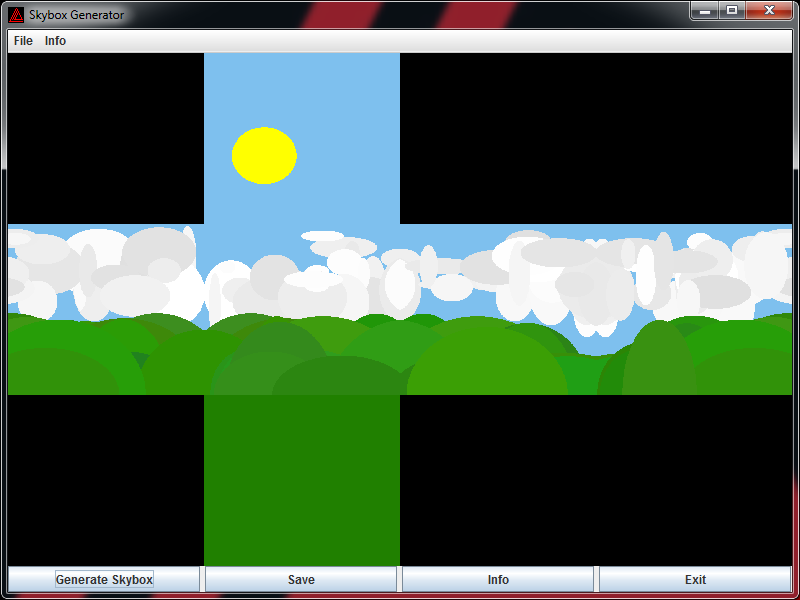
Skybox Generator Test


Previewing images created with Skybox Generator.

Skybox Generator 1.0.0.0


Download: https://goo.gl/m5zva5

Java application for generating skyboxes for 3D games. This tool allows you to create 512x512 skybox cartoonish style textures in PNG image format. Sky, sun, clouds, hills and ground can be generated with a single click.

Monday, April 2, 2018

Quiz Maker


Quiz Maker rating has been increased after the update with a new design and features. You can download the Android application here: https://goo.gl/FY4WCD

Friday, March 23, 2018

Crossroad Simulator 1.0.0.0 (Long Video)


Download: https://goo.gl/9tys47

The game helps to understand rules of the traffic on the crossroad. There are several simulation options like playback controls, game speed, zoom and traffic light toggle button. The traffic light can be powered on or off. Crossroad rules are defined using special editor for managing rules.

Keyboard controls:
A: About program
I: Zoom in
O: Zoom out
Page up: Increase speed
Page down: Decrease speed
P: Play/Pause
S: Stop
T: Toggle traffic lights on/off
Escape/Backspace: Quit/Back

Crossroad Simulator 1.0.0.0 (Short Video)


Download: https://goo.gl/9tys47

The game helps to understand rules of the traffic on the crossroad. There are several simulation options like playback controls, game speed, zoom and traffic light toggle button. The traffic light can be powered on or off. Crossroad rules are defined using special editor for managing rules.

Keyboard controls:
A: About program
I: Zoom in
O: Zoom out
Page up: Increase speed
Page down: Decrease speed
P: Play/Pause
S: Stop
T: Toggle traffic lights on/off
Escape/Backspace: Quit/Back

Thursday, March 22, 2018

Turbo Tunnel 1.0.0.0


Download: https://goo.gl/ZMeSWu

Racing game created in C++ programming language using Visual Studio.

Race through the high speed tunnels to the eternity and avoid various kind of barriers to get score. Avoiding a barrier will give you 50 score. 10000 score is required for one life. The level is generating randomly in different patterns and colors. There are 10 levels in the game. The speed will be increasing after every level.

The game can be played with keyboard and joystick.

Keyboard controls:
W/A/S/D: Move
Space: Jump
Escape/Backspace: Quit/Back

Joystick controls:
D-pad: Move
Button 1: Jump
Button 2: Quit/Back

Turbo Tunnel 1.0.0.0 (Gameplay Video)


Download: https://goo.gl/ZMeSWu

Racing game created in C++ programming language using Visual Studio.

Race through the high speed tunnels to the eternity and avoid various kind of barriers to get score. Avoiding a barrier will give you 50 score. 10000 score is required for one life. The level is generating randomly in different patterns and colors. There are 10 levels in the game. The speed will be increasing after every level.

The game can be played with keyboard and joystick.

Keyboard controls:
W/A/S/D: Move
Space: Jump
Escape/Backspace: Quit/Back

Joystick controls:
D-pad: Move
Button 1: Jump
Button 2: Quit/Back

Monday, March 19, 2018

Crossroad Rule Editor 1.0.0.0


The rules of the crossroad are created with special Crossroad Rule Editor tool. The rule items can be added and edited by clicking on the check boxes. Rules include information about vehicle directions and directions that are accepted for going through the crossroad. The tool shows total number of rule items and number of errors if there are any on the bottom. Errors will be shown for duplicate items and invalid rules. The file can be saved to JSON format and C++ header file that contains all rules can be easily generated. This program is created in Java programming language.

Crossroad Simulator 1.0.0.0


Download: https://goo.gl/9tys47

The game helps to understand rules of the traffic on the crossroad. There are several simulation options like playback controls, game speed, zoom and traffic light toggle button. The traffic light can be powered on or off. Crossroad rules are defined using special editor for managing rules.

Keyboard controls:
A: About program
I: Zoom in
O: Zoom out
Page up: Increase speed
Page down: Decrease speed
P: Play/Pause
S: Stop
T: Toggle traffic lights on/off
Escape/Backspace: Quit/Back

Space Scape 1.0.0.0


Download: https://goo.gl/xR57b7

Shooter game created in C++ programming language using Visual Studio.

The player is surrounded by unlimited number of space ships. They are coming from the top side of the screen. Some space ships are easy to destroy and stronger ones will start to appear after some time. The game gets harder and harder. For every 50th kill, a pickup item will appear. There are several pickup types: weapon, shield, time, bonus score and explosion. The advanced weapons need an ammo. When player runs out of ammo for stronger weapons, weapon will downgrade. The maximum weapon level is 6. 10000 score is required to get one life.

The programming of this game involves a lot of trigonometry functions. They are used for calculating player movement and rotation, bullets, explosions and space ship control.

The game can be played with keyboard and joystick.

Keyboard controls:
W/A/S/D: Move
K: Shoot
Escape/Backspace: Quit/Back

Joystick controls:
D-pad: Move
Button 1: Shoot
Button 2: Quit/Back